

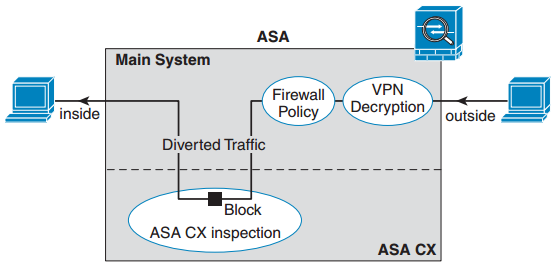
ASA CX adalah salah satu IPS non dedicated yang ditawarkan oleh Cisco dan dibundling dengan ASA.
CX module menjalankan aplikasi yang terpisah dari ASA. Konfigurasi CX module terbagi atas 2 bagian yang sama pentingnya, yaitu konfigurasi policy di ASA CX, menggunakan Cisco Prime Security Manager (PRSM) yang biasanya sudah terinstal secara local di ASA, dan ASA policy untuk mengalihkan traffic ke ASA CX module, menggunakan ASDM yang juga sudah ada di local ASA.Traffic akan melewati firewall ASA sebelum dikirimkan ke ASA CX module. Aliran traffic dari ASA ke ASA CX module dijelaskan sebagai berikut:
- Traffic memasuki firewall ASA
- Incoming VPN traffic didekripsi
- Firewall policies diterapkan pada traffic yang melewati ASA
- Traffic dikirimkan ke ASA CX module
- ASA CX module menginspeksi traffic yang lewat berdasarkan security policy
- Traffic yang dianggap valid dikembalikan ke ASA; beberapa traffic akan diblok oleh ASA CX jika ternyata menurut security policy tidak dapat dilewatkan
- Outgoing VPN traffic dienkripsi
- Traffic keluar dari ASA.
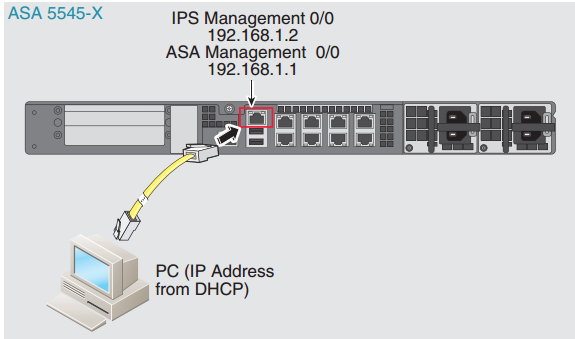
Menghubungkan Kabel Management Interface
Model ASA 5545X menjalankan ASA CX module sebagai software module. Interface management ASA CX dan Management 0/0 ASA berbagi port yang sama. Default address interface management ASA CX Module adalah 192.168.1.2.
Instalasi Software Module
- Software ASA CX
Kedua file ini harus ada saat instalasi ASA CX Module:- ASA CX Boot Image, diinstal saat reimage ASA CX atau keperluan disaster recovery. System Software package harus diinstal setelah boot image terinstal agar dapat berfungsi normal. Nama file boot image sebagai berikut:
Untuk ASA CX5545 di artikel ini menggunakan file: asacx-5500x-boot-9.2.1.1-48.img- asacx-boot-<version>.img, untuk Cisco ASA 5585-X CX Security Services Processor.
- asacx-5500x-boot-<version>.img, untuk ASA CX software module
- ASA CX System Software, berisi operating system dan program aplikasi. Penamaan file ASA CX system software package mengikuti pola berikut: asacx-sys-<version>.pkg.
Untuk ASA CX5545 di artikel ini menggunakan file: asacx-sys-9.2.1.1-48.pkg
- ASA CX Boot Image, diinstal saat reimage ASA CX atau keperluan disaster recovery. System Software package harus diinstal setelah boot image terinstal agar dapat berfungsi normal. Nama file boot image sebagai berikut:
- Transfer file boot image ke ASA, bisa menggunakan ASDM maupun menggunakan CLI. Jangan mentransfer file system software terlebih dulu, karena akan ditransfer ke SSD setelah proses setup selesai.
- Masuk ke EXEC mode di ASA CLI, untuk instalasi baru atau reimaging ASA CX Module masukkan command berikut:
Packetnotes(config)# sw-module module cxsc uninstall
Module cxsc will be uninstalled. This will completely remove the disk image assocated with the sw-module including any configuration that existed within it.

Uninstall module cxsc? [confirm]
Uninstall issued for module cxsc.
Packetnotes(config)# sw-module module ips shutdown
Shutdown module ips? [confirm]
Shutdown issued for module ips.
Packetnotes(config)# reload
- Set lokasi boot image ASA CX module di ASA disk0:
Packetnotes(config)# sh disk0:
Packetnotes(config)# sw-module module cxsc recover configure image disk0:/ asacx-5500x-boot-9.2.1.1-48.img
- Load ASA CX boot image dengan memasukkan command berikut:
Packetnotes(config)# sw-module module cxsc recover boot

Module cxsc will be recovered. This may erase all configuration and all data on that device and attempt to download/install a new image for it. This may take several minutes.

Recover module cxsc? [confirm]
Recover issued for module cxsc.
- Tunggu kurang lebih 5 menit sampai ASA CX module boot up, lalu buka console session ke ASA CX boot image yang sedang berjalan. Default username adalah admin dan default password adalah Admin123.
Packetnotes(config)# session cxsc console Opening console session with module cxsc. Connected to module cxsc. Escape character sequence is 'CTRL-^X'. Cisco ASA CX Boot Image 9.2.1.1 asacx login: admin Password: Admin123 Cisco ASA CX Boot 9.2.1.1 (48) Type ? for list of commands - Lanjutkan dengan mempartisi SSD
asacx-boot>partition
Disk /dev/sda doesn't contain a valid partition table
  WARNING: You are about to erase all policy configurations and data.
  You cannot undo this action.
Are you sure you want to proceed? [y/n]:y
- Masuk ke tahap setup untuk memasukkan pengaturan dasar ASA CX Module. Jangan keluar dari ASA CX CLI setelah pengaturan selesai, karena akan dilakukan instalasi software image.
asacx-boot>setup Welcome to Cisco Prime Security Manager Setup [hit Ctrl-C to abort] Default values are inside [] Enter a hostname [asacx]: Packetnotes-IPS Do you want to configure IPv4 address on management interface?(y/n) [Y]: y Do you want to enable DHCP for IPv4 address assignment on management interface?(y/n) [N]:N Enter an IPv4 address [192.168.8.8]: 172.21.1.12 Enter the netmask [255.255.255.0]: 255.255.255.0 Enter the gateway [192.168.8.1]: 172.21.1.1 Do you want to configure static IPv6 address on management interface?(y/n) [N]: N Stateless autoconfiguration will be enabled for IPv6 addresses. Enter the primary DNS server IP address: 172.16.1.114 Do you want to configure Secondary DNS Server? (y/n) [n]: N Do you want to configure Local Domain Name? (y/n) [n]: Y Enter the local domain name: Packetnotes.co.id Do you want to configure Search domains? (y/n) [n]: Y Enter the comma separated list for search domains: Packetnotes.com Do you want to enable the NTP service? [Y]: Y Enter the NTP servers separated by commas: 172.16.1.1 - Setelah mengisi pengaturan, summary dari setting akan ditampilkan. Verifikasi pengaturan, pilih Y untuk menerapkan konfigurasi, dan pilih N untuk batal.
Apply the changes?(y,n) [Y]: Y
Configuration saved successfully!
Applying...
Restarting network services...
Done.
Press ENTER to continue...
- Ping ke IP management ASA, IP lokal komputer (ftp & tftp server) dan IP gateway, pastikan sukses
asacx-boot>ping 172.21.1.11
PING 172.21.1.11 (172.21.1.11): 56 data bytes
64 bytes from 172.21.1.11: seq=0 ttl=255 time=5.074 ms
64 bytes from 172.21.1.11: seq=1 ttl=255 time=0.482 ms
64 bytes from 172.21.1.11: seq=2 ttl=255 time=0.415 ms

--- 172.21.1.11 ping statistics ---
3 packets transmitted, 3 packets received, 0% packet loss
round-trip min/avg/max = 0.415/1.990/5.074 ms

asacx-boot>ping 172.21.1.13
PING 172.21.1.13 (172.21.1.13): 56 data bytes
64 bytes from 172.21.1.13: seq=0 ttl=128 time=2.218 ms
64 bytes from 172.21.1.13: seq=1 ttl=128 time=0.741 ms
64 bytes from 172.21.1.13: seq=2 ttl=128 time=0.745 ms


--- 172.21.1.13 ping statistics ---
3 packets transmitted, 3 packets received, 0% packet loss
round-trip min/avg/max = 0.741/1.234/2.218 ms
asacx-boot>ping 172.21.1.1
PING 172.21.1.1 (172.21.1.1): 56 data bytes

--- 172.21.1.1 ping statistics ---
11 packets transmitted, 0 packets received, 100% packet loss
- Ganti password admin:
asacx> config passwd
The password must be at least 8 characters long and must contain
at least one uppercase letter (A-Z), at least one lowercase letter
(a-z) and at least one digit (0-9).
Enter password: admin
Confirm password: P@cketNotes2015
SUCCESS: Password changed for user admin
- Instalasi ASA system software. Download file package dari ftp server yang sudah kita siapkan.
asacx-boot>system install ftp://172.21.1.13/asacx-sys-9.2.1.1-48.pkg Verifying Enter credentials to authenticate with ftp server Username: admin Password: P@cketNotes2015 Verifying Downloading Extracting Package Detail Description: Cisco ASA-CX 9.2.1.1-48 System Upgrade Requires reboot: Yes Do you want to continue with upgrade? [y]: y Warning: Please do not interrupt the process or turn off the system. Doing so might leave system in unusable state. Upgrading Starting upgrade process ... Populating new system image Copying over new application components Cleaning up old application components Reboot is required to complete the upgrade. Press 'Enter' to reboot the system. - Tekan enter untuk reboot system, tunggu sekitar 10-15 menit untuk menunggu instalasi komponen dan ASA CX Module siap.
- Keluar dari ASA CX CLI, cek dengan command show module untuk memastikan apakah module cxsc sudah up:
Packetnotes(config)# sh module

Mod  Card Type                                    Model              Serial No.
---- -------------------------------------------- ------------------ -----------
   0 ASA 5545-X with SW, 8 GE Data, 1 GE Mgmt     ASA5545            FCH182871AQ
 ips Unknown                                      N/A                FCH182871AQ
cxsc ASA CX5545 Security Appliance                ASA CX5545         FCH182871AQ

Mod  MAC Address Range                 Hw Version   Fw Version   Sw Version
---- --------------------------------- ------------ ------------ ---------------
   0 58f3.9cf7.25aa to 58f3.9cf7.25b3  1.0          2.1(9)8      9.1(3)
 ips 58f3.9cf7.25a8 to 58f3.9cf7.25a8  N/A          N/A
cxsc 58f3.9cf7.25a8 to 58f3.9cf7.25a8  N/A          N/A          9.2.1.1

Mod  SSM Application Name           Status           SSM Application Version
---- ------------------------------ ---------------- --------------------------
 ips Unknown                        No Image Present Not Applicable
cxsc ASA CX                         Up               9.2.1.1

Mod  Status             Data Plane Status     Compatibility
---- ------------------ --------------------- -------------
   0 Up Sys             Not Applicable
 ips Down               Not Applicable
cxsc Up                 Up

Mod  License Name   License Status  Time Remaining
---- -------------- --------------- ---------------
 ips IPS Module     Disabled        perpetual
Terlihat dari capture diatas, modul ASA CX telah up.
Bersambung ke part 2, Redirecting Traffic from ASA to ASA CX
1 Comment