


OSPF is configured on routers Amani and Lynaic. Amani’s S0/0 interface and Lynaic’s S0/1 interface are in Area 0. Lynaic’s Loopback0 interface is in Area 2.
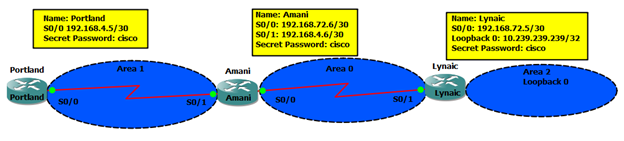
Your task is to configure the following:
Portland’s S0/0 interface in Area 1
Amani’s S0/1 interface in Area 1
Use the appropriate mask such that ONLY Portland’s S0/0 and Amnani’s S0/1 could be in Area 1.
Area 1 should not receive any external or inter-area routes (except the default route).
Penjelasan
- Di cek di router Portland, apakah OSPF sudah jalan dan cek interface-nya
Portland#sh ip pro Portland#sh ip route 192.168.4.0/30 is subnetted, 1 subnets C 192.168.4.4 is directly connected, Serial0/0 Portland#sh ip int br Interface IP-Address OK? Method Status Protocol FastEthernet0/0 unassigned YES NVRAM administratively down down Serial0/0 192.168.4.5 YES NVRAM up up FastEthernet0/1 unassigned YES NVRAM administratively down down Serial0/1 unassigned YES NVRAM administratively down down - Setting IP address untuk OSPF area 1 dan konfigurasi area 1 sebagai stub
Dari IP address bisa diketahui kalau subnetnya adalah 192.168.4.4/30 (192.168.4.4 – 192.168.4.7).Jadi commandnya untuk area 1 adalah 192.168.4.4 0.0.0.3 area 1. Command ini diletakkan di router Portland dan Amani dibawah statement router ospf.Dari pertanyaannya diminta agar area 1 tidak menerima external atau inter-area route kecuali via default route. Jika tidak ingin menerima external route, kita blok LSA type 5, untuk inter-area route, kita blok LSA type 3. Jadi konfigurasi area 1 sebagai area totally stub. Caranya dengan menambahkan dibawah router ospf command area 1 stub di Portland, dan area 1 stub no-summary di router Amani (ABR area 1).Portland#conf t Portland(config)#router ospf 1 Portland(config-router)#network 192.168.4.4 0.0.0.3 area 1 Portland(config-router)#area 1 stub Portland(config-router)#end
- Cek di router dan Amani, apakah OSPF sudah jalan, cek interface dan catat OSPF process-nya
Amani #sh ip int br
Interface                  IP-Address      OK? Method Status                Protocol
FastEthernet0/0            unassigned      YES NVRAM  administratively down down
Serial0/0                  192.168.72.6    YES NVRAM  up                    up
FastEthernet0/1            unassigned      YES NVRAM  administratively down down
Serial0/1                  192.168.4.6     YES NVRAM  up                    up
Interface yang terhubung ke router Portland adalah 192.168.4.6, sudah satu subnet dengan interface di router Portland
Amani#sh ip pro
Routing Protocol is "ospf 1"
  Outgoing update filter list for all interfaces is not set
  Incoming update filter list for all interfaces is not set
  Router ID 192.168.72.6
  Number of areas in this router is 1. 1 normal 0 stub 0 nssa
  Maximum path: 4
  Routing for Networks:
    192.168.72.4 0.0.0.3 area 0
 Reference bandwidth unit is 100 mbps
  Routing Information Sources:
    Gateway         Distance      Last Update
    192.168.72.6         110      00:01:10
    10.239.239.239       110      00:01:00
  Distance: (default is 110)
- Konfig router Amani ke area 1 dan sebagai stub area
Amani#conf t
Amani(config)#router ospf 1
Amani(config-router)#network 192.168.4.4 0.0.0.3 area 1
Amani(config-router)#area 1 stub no-summary
Amani(config-router)#exit
- Periksa routing table Portland dan Amani
Portland#sh ip route

Gateway of last resort is 192.168.4.6 to network 0.0.0.0

     192.168.4.0/30 is subnetted, 1 subnets
C       192.168.4.4 is directly connected, Serial0/0
O*IA 0.0.0.0/0 [110/65] via 192.168.4.6, 00:00:48, Serial0/0

Amani#sh ip route

     192.168.72.0/30 is subnetted, 1 subnets
C       192.168.72.4 is directly connected, Serial0/0
     192.168.4.0/30 is subnetted, 1 subnets
C       192.168.4.4 is directly connected, Serial0/1
     10.0.0.0/32 is subnetted, 1 subnets
O IA    10.239.239.239 [110/65] via 192.168.72.5, 00:00:28, Serial0/0